
Promotion Codes
Offer customers fixed value, percentage, or shipping discounts on product categories with customizable usage limits and requirements.
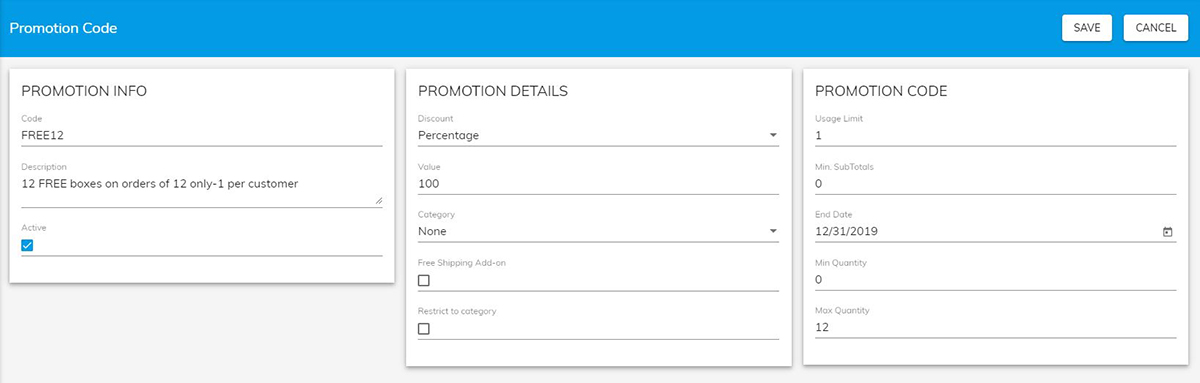
You can offer your customers a fixed value, percentage, or shipping discount on product categories in your Print Store. You can specify usage limits, minimum subtotals, valid end date, or min and max quantity that applies.
- From your Unified admin, go to Print Store>Settings>Promotion Codes.
- To add a new promotion code click +Add Promotion Code button. See Options below to create your promotion code and click Save to Save.
- To export promotion codes to excel click Export Promotion button.
- To import promotion codes from excel click the Import Promotion button.
Promotion Info
| Field | Description |
|---|---|
| Code | The code name to refer to and to enter into Print Store. |
| Description | The description for you to give to remind you (the admin) what it does. |
| Active | To make the code active or not. |
Promotion Details
| Field | Description |
|---|---|
| Discount | Set Monetary Value or Percentage based pricing. Or create a Free shipping only code. |
| Category | Code will apply if at least one product from a matching category is added to cart. |
| Shipping | Apply free shipping along with a discount selection. |
| Restrict to category | If you have multiple items in the cart discount will only apply to category selection above and not entire order. |
Requirements/Expiration
| Field | Description |
|---|---|
| Usage Limit | The number of times that code can be used for each unique customers. Leave empty for no restriction. |
| Min. SubTotals | Only apply promotion if min SubTotal is met. |
| End Date | When will the promotion expire. |
| Min Quantity | Only apply promotion if min Quantity is met. |
| Max Quantity | Only apply promotion if max Quantity is met. |