Blog Content
Your PrintNow online store comes with a built-in blogging engine to build your audience and generate more traffic and sales.
Your PrintNow online store comes with a built-in blogging engine. Blogging is a great way to build your audience and generate more traffic and sales for your business. Setting up a blog can help you build a community around your products and your brand.
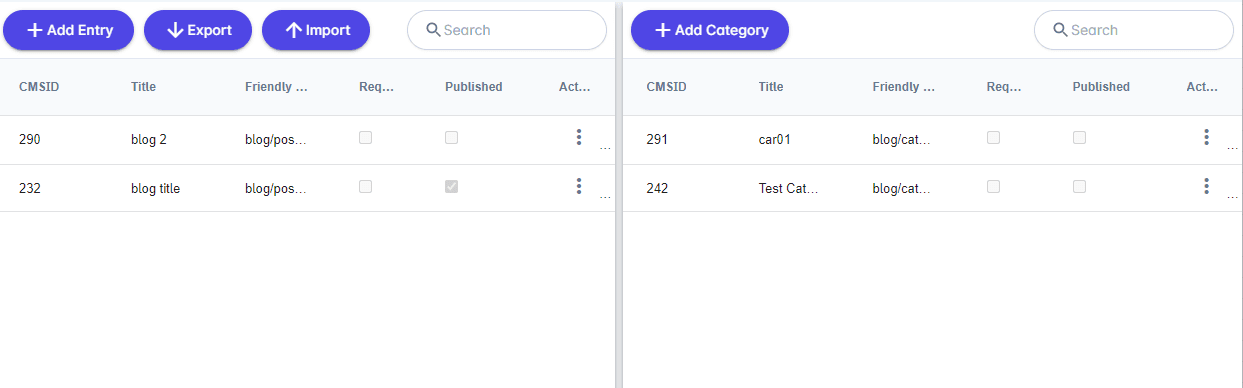
From your Unified admin, go to Print Store>Content>Blog Content. To add a Blog Category click Add Category button. To add a Blog Page click Add Entry button. To edit an existing entry click Actions Icon and Edit.
| Field | Description |
|---|
| Published Date | The published date of your blog post. |
| Published | Publish post or hide from view. |
| Require Login | Decide if user is required to be logged into the Print Store to view blog post. |
| Layout | Choose from default, fixed width, full width. |
| Field | Description |
|---|
| Categories | Choose what categories your blog post will display in. |
| Tags | Tags display on Print Store and are searchable. |
| Field | Description |
|---|
| Replace thumbnail | Default feature image for your blog post. |
| Field | Description |
|---|
| Url | The URL related path to the blog post. |
| Excerpt | An excerpt is the short description text linked to the whole blog post. |
| Allow Comments | When enabled will allow customers to add comments powered by Disqus. |
| Field | Description |
|---|
| Published | Publish category or hide from view. |
| Require Login | Decide if user is required to be logged into the Print Store to view category page. |
| Url | The URL related path to the category. |
PrintNow offers rich HTML editing software for fast development with developer and user experience in mind. Our products are the building blocks for creating and editing beautiful content easier and faster.
| Field | Description |
|---|
| Title | Page title. |
| Keywords | Strong keywords will help your page perform well with SEO. |
| Description | Page description. |
| Friendly URL | A URL that is both readable to users and search engines. |
