
Category Content
The Category CMS allows you to add and control content to product category pages with customizable layouts, SEO settings, and page tabs.
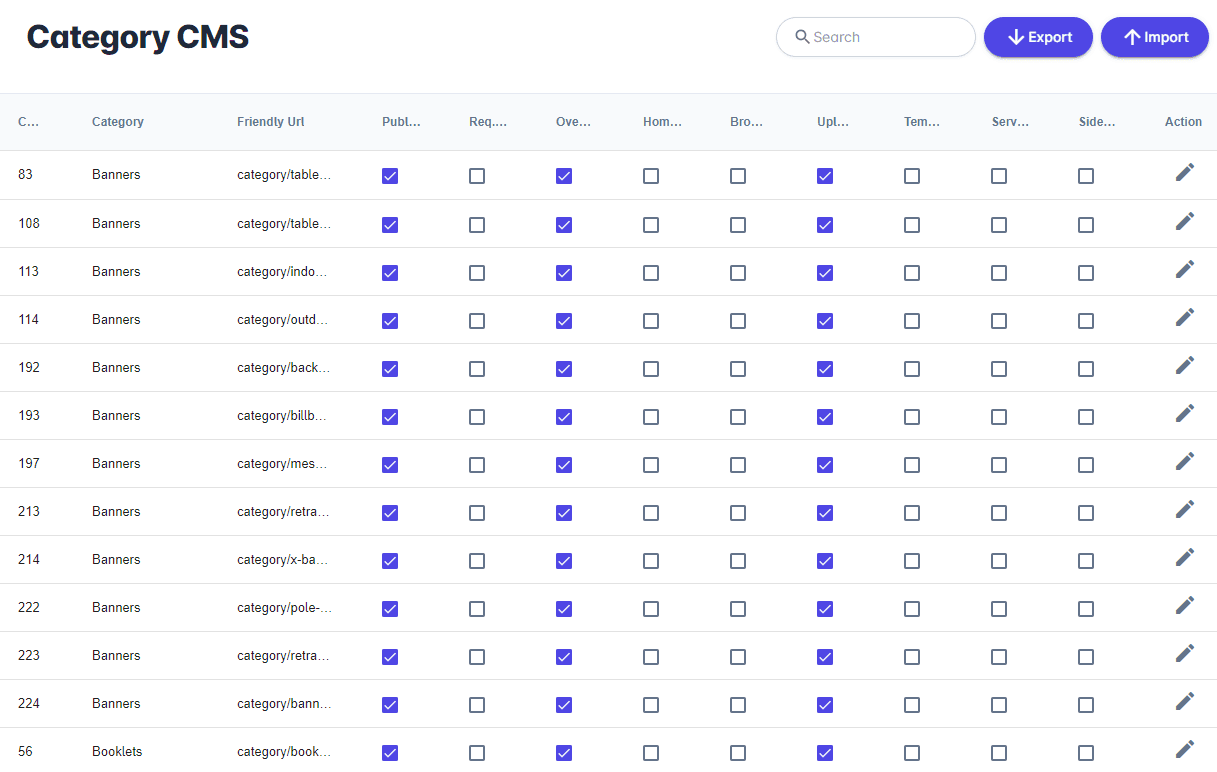
The Category CMS allows you to add and control content to product category pages. From your Unified admin, go to Print Store>Category CMS. To edit an existing category page click Actions Icon.
Category Details
| Field | Description |
|---|---|
| Published | Publish page or hide from view. |
| Req. Login | When enabled, requires login. |
| Show Overview | When enabled, shows calculator and enabled buttons. When disabled, shows product browser with all products enabled under that category. |
| Show on Homepage | Show or hide category on Home page. |
| Browse Designs | Allow user the choice to browse products. Redirected to the product browser. |
| Custom Upload | Allow user the choice to upload print-ready files. Redirected to the custom upload page. |
| Inline Template | Allow user the choice to request design services. |
| Design Service | Redirects the user to a specific template mapped to the size selection in the calculator. |
| Sidebar | Show or hide Sidebar. |
| Layout | Choose from the dropdown menu. |
Page SEO
| Field | Description |
|---|---|
| Title | Page title. |
| Keywords | Strong keywords will help your page perform well with SEO. |
| Description | Page description. |
| Friendly URL | A URL that is both readable to users and search engines. |
Design & Code Editors
PrintNow offers rich HTML editing software for fast development with developer and user experience in mind. Our products are the building blocks for creating and editing beautiful content easier and faster.
Page Tabs
Add tabs using the '+ Add Tabs' button in the right corner - You can use these built in Tab controls or add your own using the WYSIWYG Editor.